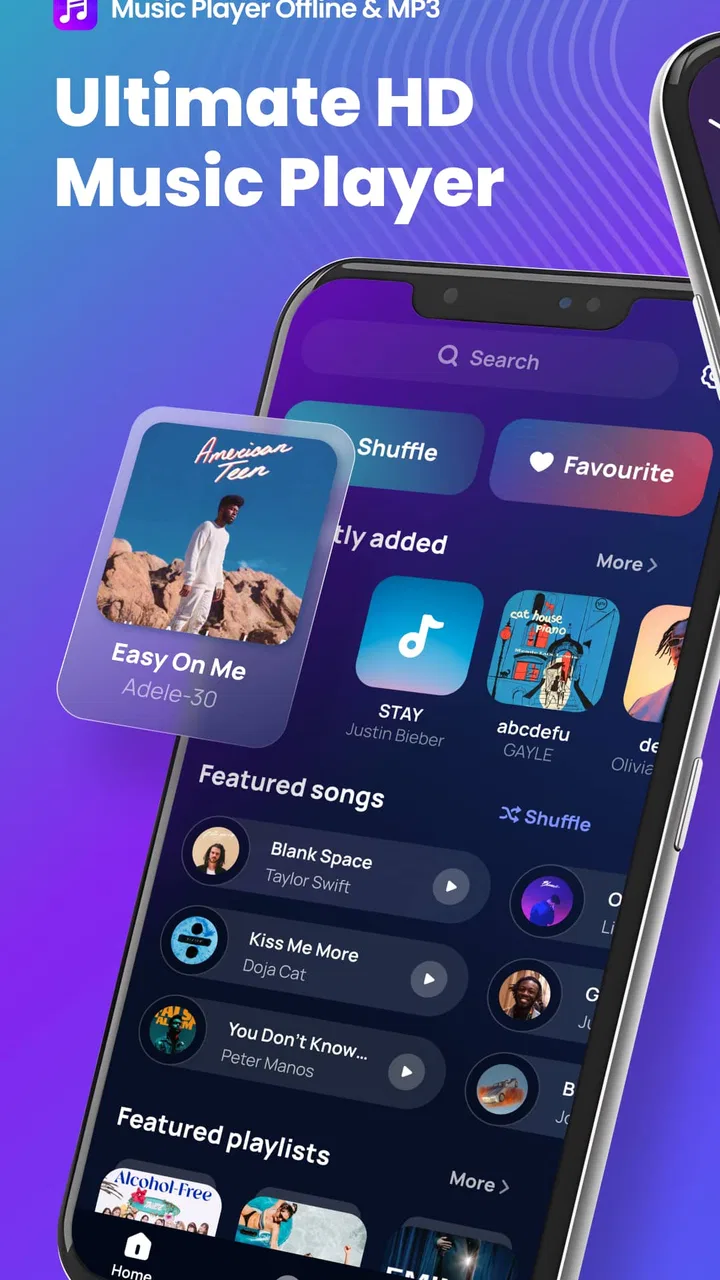
Music Player Offline & MP3
- 4.6
- Rating
- 10.00M
- Installs
- Free
- Price

 Analysis by App-foxy
When I want to listen to music without depending on a signal, I prefer a player that gets out of the way quickly. Music Player Offline & MP3 is built around that simple idea: choose the audio already stored on the device, organize it into playlists, and listen with more control than the basic phone player usually offers. I tested it as a practical music and audio app rather than as a streaming replacement, and that distinction matters from the first minute.
The app is free, aimed at Everyone, and comes from AceTools Team. Its appeal is easy to understand: it combines local MP3 playback with an equalizer, lyrics support, and playlist tools. The current release is version 2.3.0, and it works on devices running Android 6.0 or later. I would recommend it most readily to someone who already keeps music files on a phone and wants a cleaner way to browse them, especially during travel, commuting, exercise, or anywhere mobile data is unreliable.
Getting from installation to a useful first listen
I start by treating setup as a quick check of the music already on my device, rather than expecting a ready-made catalog. A familiar track is a useful test: it lets me confirm playback and gives me a reference for any later sound adjustments. Once that first listen works, I can decide what kind of playlist would make the app useful in my daily routine.
You May Also Like

 Blood Strike: 2.5 Anniversary
Blood Strike’s Loadouts Turn Every Drop Into a Tactical Gamble
A close look at Blood Strike’s custom loadouts: how fast access to signature weapons reshapes its battle royale rhythm, rewards preparation, and narrows the gap between fights.

 Pandora - Music & Podcasts
Pandora’s Music Is Easy to Start, but Harder to Recover
Pandora’s strength is its low-effort path from a seed to a station. Its weak spot is how much confidence it asks you to place in connection, setup, and quiet recovery.

 8 Ball Pool
 Is Built on Rivalries, Rematches, and Routine
A close look at the rivalries, rematches, shared routines, and unanswered safety questions that turn a quick pool match into a persistent mobile community.

 Samsung Music
’s Quiet Strength Is Playing What You Already Own
Its reach comes less from spectacle than from dependable access to a personal library. That simplicity is both the app’s strongest retention engine and its ceiling.

 AccuWeather: Weather Radar
AccuWeather Review: A Quick, Clear Forecast for Everyday Decisions
For everyday plans, the best forecast is the one you can understand quickly. AccuWeather makes rain timing, radar, and local conditions easy to act on, with a few trade-offs.

 Hill Climb Racing
Why Hill Climb Racing Still Turns Crashes Into One More Run
A tiny car, a bumpy hill and one more upgrade: Hill Climb Racing keeps resurfacing because its simple chaos makes every near-miss feel personal.
More From Our News Desk



What to expect before opening it
The most important thing to understand is that this is an offline music player, not a catalog for discovering or downloading songs. It does not replace a streaming service when I want instant access to unfamiliar artists or a huge online library. Its job is different: it gives personal audio files a dedicated home and adds listening controls that can make those files easier to enjoy.
That focus is a strength if your collection is already on the phone. I can listen without waiting for a connection, avoid using mobile data, and keep music available in places where streaming is inconvenient. It also makes the app a sensible option for people who prefer to manage their own files instead of maintaining a subscription. On the other hand, a new user with an empty music folder may open it and wonder why there is nothing ready to play. The app is only as useful as the local collection it can access.
The store rating sits at a 4.6 average from around 201 thousand ratings, while the app has passed 10 million installs. Those figures suggest that the basic offline-player idea works for a large audience, but they should not be mistaken for proof that it suits every listening habit. Someone who mainly uses curated online playlists will probably find a streaming app more convenient. Someone with albums, recordings, or purchased MP3 files stored locally is much closer to the intended use case.
The first setup: prepare the music library
After installing, my first step would be to make sure the music files are actually available on the device. This sounds obvious, but it is the most common reason a local player seems broken. If the phone has no MP3 files, or if the files are stored somewhere the app does not display immediately, the opening library can look empty even though the application itself is working normally.
I recommend starting with a small, familiar group of tracks rather than trying to organize an entire collection at once. A few songs from one album or one workout folder make it easier to see how the app presents titles and artists. Once those tracks appear, I can check whether the names are readable, whether album grouping makes sense, and whether the order feels useful before spending time on a larger playlist.
Because this is a local player, file organization outside the app can affect the experience inside it. Clear filenames and consistent music tags are worth fixing early. If one album uses an artist name with extra spaces and another uses a different spelling, browsing may feel fragmented even when the audio itself is fine. This is one of the less obvious lessons with a player like this: good library preparation often improves the experience more than changing playback settings.
I would also begin by choosing one song I know well. Familiar audio gives me a reference point for testing the equalizer later. A track with vocals, bass, and quieter details is more useful than a short sound effect because it reveals whether a change improves the sound or merely makes it louder.
The first successful action should be simple
My definition of a successful first session is not building a perfect library. It is finding one track, starting playback, and confirming that the controls feel understandable. From there, I would create a small playlist for a real situation, such as a morning walk or an offline commute. That gives the app an immediate purpose and avoids the vague feeling of “setting up” without actually listening.
Playlists are particularly useful when the local library contains mixed material. I can separate calm music from energetic tracks, keep language-learning audio away from albums, or make a short collection for a trip. A small playlist is also easier to test than a huge one: if the order feels wrong, I can adjust it quickly instead of searching through the entire library.
One practical workflow is to create a playlist only after listening to a few tracks in the normal library view. That lets me notice which songs I genuinely reach for instead of adding everything from one folder automatically. I find this produces more useful playlists and reduces the common problem of creating a long list that I never actually use.
The lyrics feature can add another layer to that first success. When lyrics are available for a track, they can make the player more useful for singing along or following words while practicing a language. I would treat lyrics as a helpful part of the listening experience rather than the reason to choose the app, because the quality of the result depends on the song and the information attached to the local file. The core test remains reliable playback of the music itself.
Using the equalizer without making music worse
The equalizer is one of the features that separates this app from a very basic file player, but it is also where a little restraint helps. I usually begin with the controls unchanged, listen to a familiar song, and make one small adjustment at a time. Raising several bands dramatically can create a louder sound that initially seems more exciting but becomes tiring after a few minutes.
A better approach is to adjust for the listening situation. If I am using small phone speakers, a modest change may make vocals easier to follow. With headphones, too much bass can make the sound muddy, while too much treble can make cymbals or speech feel sharp. I would compare every change with the original setting and keep the version that sounds clearer, not simply more powerful.
This also exposes an important trade-off. An equalizer can shape the sound, but it cannot repair a poor recording or replace good headphones. If a file is distorted, missing detail, or encoded badly, heavy adjustments may emphasize the problem. My tip is to use the equalizer as a finishing tool after choosing comfortable volume and suitable headphones, not as a rescue button for every track.
Common confusion during everyday use
The first confusion many people have with an offline player is expecting it to behave like a streaming service. Searching for an artist does not magically bring that artist into the library. The search and browsing experience depends on what is stored locally and how those files are labeled. Once I accept that, the app becomes much more predictable.
Another source of uncertainty is the difference between a file being on the phone and a file being easy to find. Music may be mixed with downloads, voice recordings, or other audio. A clean folder structure helps me identify what should belong in a playlist. If the library looks cluttered, I would organize the files first rather than blaming the player for every confusing title.
Lyrics can also create unrealistic expectations. A lyrics button does not change the audio file, and it does not turn every song into a perfectly synchronized karaoke track. I see it as a companion view that is most valuable when the track has usable lyric information. For casual listening, I can ignore it; for singing along, it is worth checking on the songs I use most.
Playlist order deserves attention too. A playlist made quickly may technically contain the right songs but still feel awkward because the mood changes abruptly. I prefer to listen through the first few tracks and rearrange them into a natural opening, middle, and ending. This small bit of editing is especially useful for walks or workouts, where stopping to skip songs defeats the purpose of preparing an offline set.
Where it fits beside the usual alternatives
Compared with a streaming service, Music Player Offline & MP3 offers control over the files I already own or have placed on the phone, without making online discovery the center of the experience. That is excellent for predictable listening and poor for spontaneous exploration. If I want new releases, algorithmic recommendations, or a cloud library shared across devices, I would choose a streaming platform instead.
Compared with the phone’s built-in player, this app is more attractive when I want dedicated playlist handling, an equalizer, and lyrics in one place. The advantage is not that it makes every file sound dramatically different. The advantage is having listening tools gathered around local music rather than treating audio files as an afterthought.
Compared with a more technical audio player, it may be the friendlier choice for someone who does not want to study a long list of playback settings. That simplicity is useful for first-time users, but advanced listeners may eventually want deeper control over formats, audio output, tagging, or library rules. I would not pick this app solely because it has an equalizer; I would pick it because the equalizer sits alongside straightforward local playback and playlists.
Real situations where the app makes sense
Imagine preparing for a train journey with unreliable reception. I can place a few albums and a carefully selected playlist on the phone before leaving, then use the app without worrying about buffering or spending data. If the journey is long, I can switch between a full album and a shorter playlist without opening several different tools. That is a modest benefit, but it is exactly the kind of dependable convenience an offline player should provide.
For exercise, I would make a playlist with a deliberate progression rather than simply adding the fastest songs. A steady opening can help me settle into a pace, while more energetic tracks can arrive later. The equalizer can then be adjusted for the headphones I actually use. This workflow turns the app from a passive file browser into a repeatable routine, and it does not require an internet connection during the workout.
It can also suit people who keep recordings or educational audio locally. I would separate those files into their own playlists so they do not get mixed with music. The lyrics view is less central in that scenario, but the same offline access is useful when studying in a place with poor reception. The key is to treat playlists as categories for different activities, not just as collections of favorite songs.
Limitations I noticed before recommending it
The biggest limitation is inherent to the app’s design: it depends on local audio. If your music life is almost entirely online, opening a separate player may feel unnecessary. You will need to maintain the files yourself, and that can be less convenient than pressing play on a cloud-based service. The free price is appealing, but it does not remove the work of keeping a personal collection organized.
There is also a difference between having features and having a perfect result. Equalizer controls are useful, but they require listening and adjustment. Lyrics can be enjoyable, but they are not equally important for every track. Playlists can simplify a collection, but only after I spend a little time choosing and ordering songs. In other words, the app rewards users who want some control; it is less suitable for anyone who wants everything automated.
I would also avoid judging the player by a single badly labeled file. Local audio metadata can make any library look untidy, and fixing the file information may be the proper solution. Before deciding that browsing is confusing, I would test the app with a small set of well-organized tracks. That gives a fairer picture of the interface and makes it easier to identify whether the real issue is the app or the collection.
Who should install it, and who should skip it?
I think it is a good match for listeners with MP3 files already on an Android phone, people who travel through weak-signal areas, users who want custom playlists without a subscription, and anyone who likes adjusting sound for different headphones. It is also approachable for a first-time local-player user because the path to value is short: add or locate a few tracks, play one, then build a playlist around a real routine.
I would skip it if I need a large online catalog, automatic discovery, synchronized listening across several devices, or a service that supplies the music for me. In those cases, a streaming alternative is likely to feel more natural. I would also look elsewhere if I need a specialist audio workstation rather than a convenient everyday player. This app sits in the middle: more capable than a bare file opener, but not intended to replace every advanced audio tool.
My next step after the first successful listen
Once I have confirmed that one song plays correctly, I would create two playlists instead of one giant collection: one for a regular daily activity and another for relaxed listening. I would then test the equalizer with the same familiar track, keeping the adjustment that improves clarity at a comfortable volume. Finally, I would check a few songs with lyrics if that feature matters to me. This sequence keeps setup practical and shows quickly which parts of the app I will actually use.
After that, the best improvement is consistency. I would keep related files together, use clear names, and update playlists when my habits change. The app does not need constant attention, but a little organization prevents the library from becoming difficult to navigate. That is a more useful long-term habit than repeatedly changing audio settings.
My overall impression is positive because Music Player Offline & MP3 understands a straightforward need and adds useful controls without turning local listening into a complicated project. It is free, supports older Android devices from Android 6.0 onward, and has earned broad adoption, with more than 10 million installs. Its real value is dependable personal playback, not online music discovery.
I would recommend it to a friend who has a real offline collection and wants playlists, lyrics, and sound adjustment in one place. I would explain the limitation honestly: it will not populate an empty library or replace a streaming catalog. But if your first goal is simply to play your own music smoothly, organize it for everyday situations, and make small improvements to how it sounds, this app is an easy one to try. The developer is AceTools Team, the content rating is Everyone, and there is no purchase price standing between a new user and that first meaningful offline listen.
FAQs for Music Player Offline & MP3
01What features does Music Player Offline & MP3 offer?
Music Player Offline & MP3 provides a range of features including customizable playlists, an equalizer for sound enhancement, and support for various audio formats like MP3, AAC, and WAV. Users can also enjoy a sleek, user-friendly interface and offline playback, making it ideal for listening without an internet connection.
02Is Music Player Offline & MP3 free to use?
Yes, Music Player Offline & MP3 is free to download and use. However, it may offer in-app purchases or advertisements to unlock additional features or remove ads. It's advisable to check the app store listing for any specific pricing details related to premium features.
03Can I use Music Player Offline & MP3 without an internet connection?
Absolutely! One of the key advantages of Music Player Offline & MP3 is its ability to play music offline. Once your audio files are downloaded onto your device, you can enjoy your music library without needing a Wi-Fi or data connection, making it perfect for travel or areas with poor connectivity.
04What audio formats are supported by Music Player Offline & MP3?
Music Player Offline & MP3 supports a wide range of audio formats, including popular ones like MP3, WAV, AAC, FLAC, and OGG. This versatility ensures you can play almost any audio file stored on your device, offering a comprehensive listening experience for all your music.
05How does Music Player Offline & MP3 handle playlist creation?
The app allows for easy playlist creation, enabling users to organize their music effortlessly. You can add, remove, or reorder tracks with just a few taps. Additionally, playlists can be customized with names and descriptions to suit your preferences, making music management simple and intuitive.
Pros
- Easy-to-use interface for all users.
- Supports various audio file formats.
- No internet required for playback.
- Customizable equalizer settings.
- Efficient battery usage during play.
Cons
- Ads can be intrusive at times.
- Limited features in the free version.
- No cloud integration for backups.
- Playlist management can be cumbersome.
- Occasional lag on older devices.

Music Player Offline & MP3
Gallery